
A duplicate photo finder for Mac
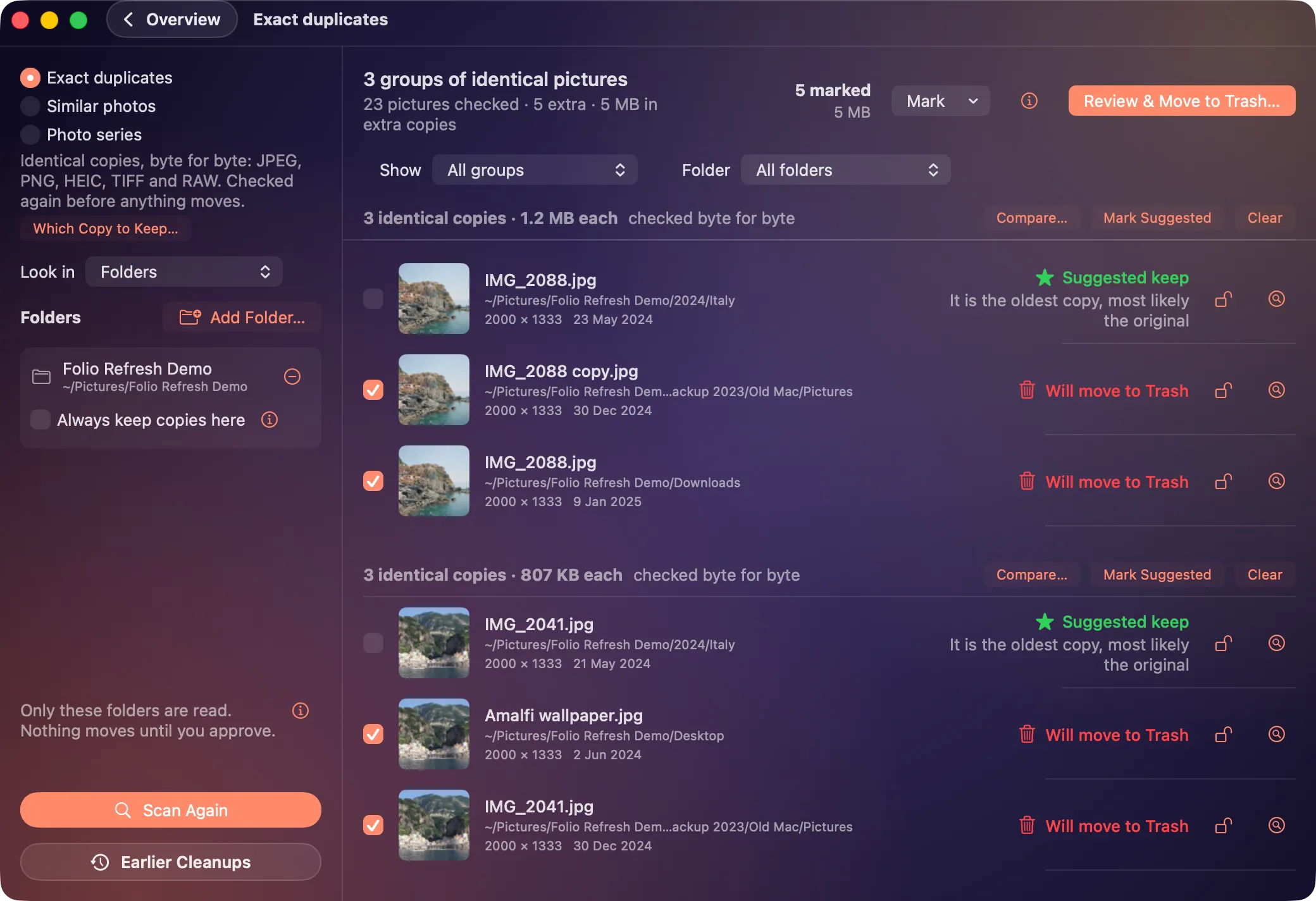
Folio Refresh finds exact copies, edited and resized versions, and bursts, in folders and drives, your Photos library, and Lightroom Classic and Capture One catalogs. It reads everything on your Mac, suggests the copy to keep with the reason, and moves nothing until you approve. Scanning is free, and so are the first 100 photos you clean; then $14.99 once.
Free to try: scan, review and clean your first 100 photos. Then $14.99 once, no subscription. For macOS 15 or later, Apple silicon and Intel.
What it finds
- Identical copies. Matched byte for byte, so a renamed copy in a backup folder is still found. JPEG, HEIC, PNG, TIFF and camera RAW.
- Similar photos. The same picture resized, re-saved, rotated, lightly cropped or edited, which a byte-for-byte finder walks past. Three settings, Conservative, Balanced and Broad; every group says “alike in appearance, not identical”, and nothing in it is ticked until you tick it.
- Bursts and series. Photos taken within seconds of each other in one folder that look alike, with the frame to keep suggested. A photo with no capture date never joins a series.
Where it looks
Most duplicate finders only read folders. Folio Refresh reads four places, and finishes in each the way that place expects:
- Folders and external drives: the copies you approve go to the Trash, where you can put any of them back.
- Apple Photos: they go into a “Folio Refresh Review” album for you to delete in Photos. Folio Refresh deletes nothing there.
- Lightroom Classic: they are marked Rejected, after a backup and while Lightroom is closed. Lightroom Classic in detail.
- Capture One: they are tagged Red, after a backup and while Capture One is closed. Capture One in detail.
If your photos are all in Apple Photos, try its own Duplicates album first: since macOS Ventura, Photos finds copies within its library and lets you merge them. Folio Refresh adds the folders, drives and catalogs outside it, the edited versions and bursts, and a reason for every suggestion.
Which copy it suggests keeping
Every group suggests one photo to keep and says why, in plain words. The rules, which you can reorder or turn off: fewer closed eyes, a clearly higher quality score, more smiles, the most pixels, filed rather than left in Downloads, the oldest. Lock any photo so it is always kept, or mark a folder so copies in it are never moved. In a catalog, the copy you edited, rated, tagged or put in an album comes first. How the suggestion is made.
What it never does
- Delete a file outright.
- Touch a photo that changed after the scan: each one is checked again first.
- Send a photo anywhere. Everything is read on your Mac, with no account and no tracking.
- Download from iCloud, unless you choose to.
What it doesn't do
- Compare videos: duplicate videos are not found. It can shrink big videos instead.
- Watch for new duplicates as they arrive. You scan when you choose.
- Match every crop. A crop much tighter than the original, or to a different shape (a square from a 3:2 photo), is not grouped; and on Broad, other takes of the same scene can join a group, which is why you look before approving.
Price
Scanning and reviewing are free, and so are the first 100 photos you act on, whether moved, added to a review album or marked in a catalog. Then $14.99 once, no subscription and no account. macOS 15 Sequoia or later, Apple silicon and Intel.
Choosing between apps? See Folio Refresh beside PhotoSweeper, Gemini 2, Duplicate Photos Fixer Pro and Excire Foto.
Try it on your own photos.
Free to try: scan, review and clean your first 100 photos. Then $14.99 once, no subscription. For macOS 15 or later, Apple silicon and Intel.