

CaddoraHome

AppStato

App Store Connect stats for iPhone and iPad

Every app's App Store numbers on one screen.

AppStato shows every app in your App Store Connect account side by side: first-time downloads, impressions, product page views and estimated proceeds, with the change against the previous period. The numbers are Apple's own, read with your own key and kept on your iPhone or iPad.

Download AppStato on the App Store

On the App Store now. For iPhone and iPad with iOS 17 or iPadOS 17 or later. Every app free for 7 days after you connect, then one app free, or AppStato Pro for every app. How connecting works.

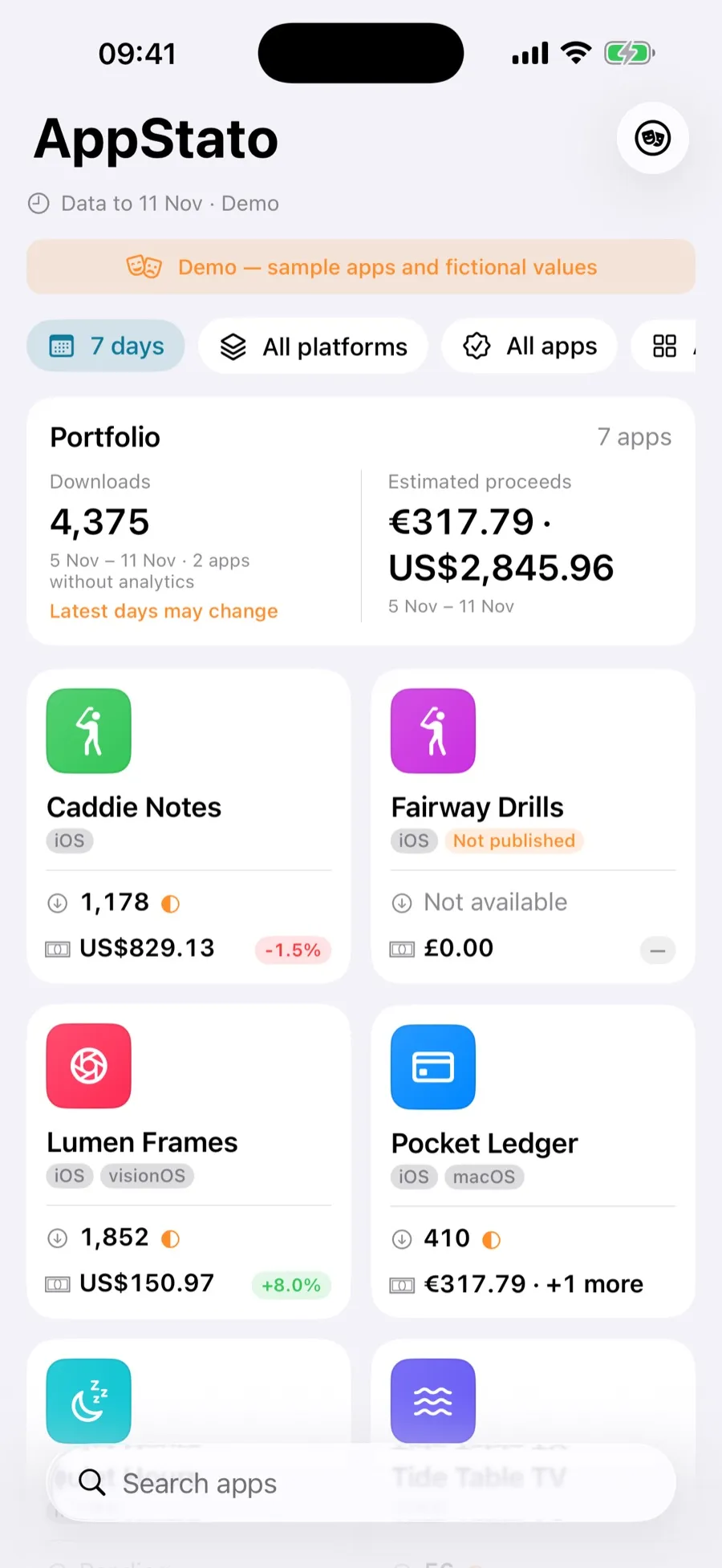
AppStato's home screen with sample apps: portfolio downloads and estimated proceeds for the last 7 days, then a tile per app with its downloads, proceeds and change
Every app on one screen
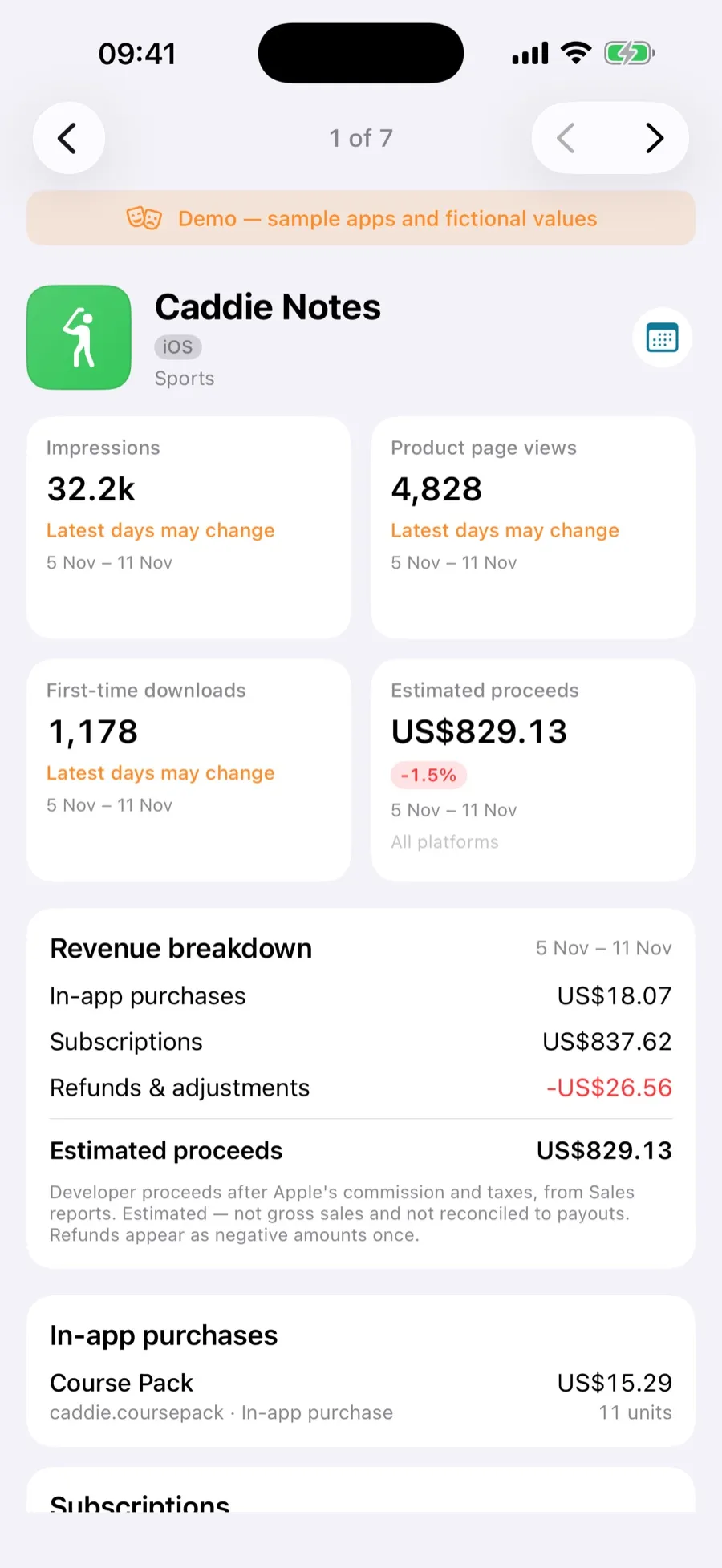
One sample app in AppStato: impressions, product page views, first-time downloads and estimated proceeds, then the revenue breakdown and its in-app purchases
One app in full

All your apps

App Store Connect stats for every app, on one screen

  • First-time downloads, impressions, product page views and estimated proceeds for each app, with the change against the previous period.
  • Portfolio totals across all your apps at the top.
  • Filter by platform (iOS, macOS, tvOS and visionOS), by category, and by published or not published.
  • Last 7 days, last 30 days, all time, or dates you choose.

Proceeds

See where your App Store proceeds come from

  • Revenue split into paid apps, in-app purchases, subscriptions and refunds, with a table for each product.
  • Every currency kept as Apple reports it and never converted, so each figure is Apple's own.
  • Taken from Apple's daily sales reports.

Apple's own numbers

Numbers straight from Apple's reports, gaps and all

  • Downloads, impressions and page views come from Apple's analytics reports, proceeds from its sales reports.
  • The newest days are marked "Latest days may change" while Apple can still revise them.
  • A day Apple has not reported is named as missing, never shown as zero.

Connecting

Connect your App Store Connect account without leaving the app

  • A step-by-step guide opens App Store Connect in a Safari sheet beside AppStato.
  • Copy your Issuer ID and vendor number, and create and download an API key (a .p8 file), all from your iPhone or iPad.
  • Not ready to connect? A labelled demo with sample apps and fictional values needs no account.

Your key and your numbers stay on your device

  1. Your own keyAppStato talks to Apple directly with an App Store Connect API key you create. The key is kept in your device's Keychain.
  2. Reports stay on your deviceYour reports are stored only on your iPhone or iPad. There is no Caddora server, and we never see your numbers.
  3. No account, no trackingNo account to create, no analytics, no adverts and no tracking.
  4. Disconnect any timeDisconnecting removes the key, and can delete the reports kept on the device.

App icons and release dates come from Apple's public lookup, which is given each app's ID and nothing about you. The privacy policy has the rest.

Price

After you connect, every app is unlocked free for 7 days. Then you pick one app to keep free, and can change which once every 30 days, or subscribe to AppStato Pro to see all your apps: €1.99 a month or €14.99 a year. The subscription is sold by Apple and renews automatically until you cancel it in your Apple Account's subscriptions. Restore Purchases and Manage Subscription are in the app, under Settings › AppStato Pro. Prices in other currencies vary by country. Before connecting, a labelled demo with sample apps and fictional values shows how it works, with no account.

Questions

Are AppStato's numbers the same as App Store Connect's?

Downloads, product page views and proceeds match. Impressions from Apple's reports can read a little lower than App Store Connect's own dashboard. Analytics days are in UTC and sales days in Pacific Time, as Apple reports them. And because App Store Connect's dashboard only shows a day once Apple has finished revising it, AppStato can show one more, early, day of downloads, marked "Latest days may change".

Is my App Store Connect key safe?

The key is yours and stays on your iPhone or iPad, in the Keychain. AppStato uses it only to read your reports from Apple, directly: there is no Caddora server in between, no account and no tracking. Disconnecting removes it.

Why does it need an Admin key?

Once only, so that Apple starts generating analytics reports for your apps. Apple makes those reports only after an Admin key has asked for them. AppStato reads your reports and nothing else.

What does AppStato cost?

After you connect, every app is unlocked free for 7 days. Then you pick one app to keep free, which you can change once every 30 days, or subscribe to AppStato Pro to see all of them: €1.99 a month or €14.99 a year, renewed by Apple until you cancel.

Why are my proceeds in more than one currency?

Apple's sales reports give proceeds in the currencies your apps sold in. AppStato keeps each one as Apple reports it rather than converting it, so no exchange rate is guessed at.

Where can I get AppStato?

On the App Store, for iPhone and iPad with iOS 17 or iPadOS 17 or later. Every app is free for 7 days after you connect; then one app stays free, or AppStato Pro shows them all.

Help and the small print